One of the use scenarios to sync web push notifications involves using RSS feed, see: How to send OneSignal RSS Push Notifications Using Zapier
For setting up OneSignal with Drupal see: How To Setup Web Push Notifications For Drupal 8 (Or Any Other Site) Using OneSignal
Today I will write about how to send RSS web push notification using custom-built RSS feed, OneSignal, and Zapier for the country based segment.
As usual, I will provide an example of real situation - about 743 subscribers from more than 25,000 are from Georgia. As Georgia related content is often featured on blog, I decided it would be a good to keep users engaged, by sending a new push notification every time a new Georgia related content is created.
As a Drupaller, I've built already a pretty complicated RSS feed driven Mailchimp e-newsletter. Now, let's see can we apply the same rules for Web Push Notifications.
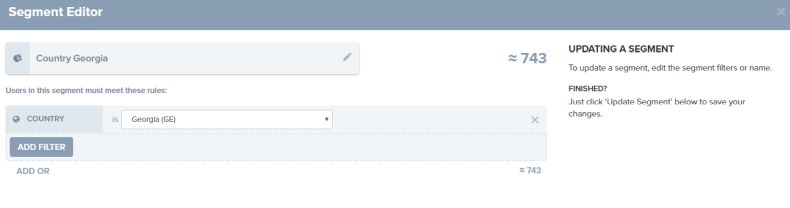
User segmentation in OneSignal
I wish there were better user segmentation options on onesignal, but for now, segmenting users from a country seems a good starting point.
In fact, this Web Push notification campaign will be similar to the e-mail campaigns automatically sent using RSS and Mailchimp. See: How To Sync Drupal RSS Feed to Mailchimp
As I've already defined a custom RSS feed for Georgia related content I will just simply reuse it: https://www.reinisfischer.com/georgia.xml
To make the magic happen I should make a Zapier app, and here is the details:
From your Zapier account make a new Zap - RSS + OneSignal
As the steps are pretty easy to complete setting up the connection, I will not cover them here, just once in editing OneSignal settings, make sure to include your segment in Segment Names to Send To
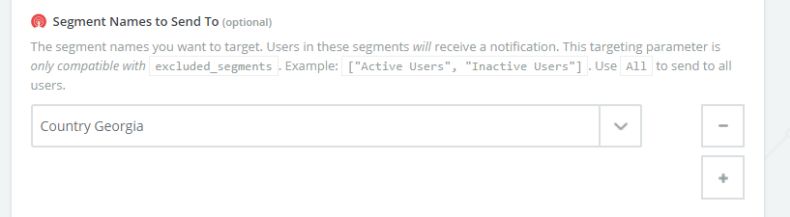
Segment Names to Send To
The segment names you want to target. Users in these segments will receive a notification. This targeting parameter is only compatible with excluded_segments. Example: ["Active Users", "Inactive Users"]. Use All to send to all users.
That's it - make sure to save your configuration and enable this ZAP.