Luckily, some time ago I was working on Georgian language site, and I remember I used neat module String Overrides:
Provides a quick and easy way to replace any text on the site.
For todays challenge - I had to change (translate) strings on Drupal comment form and provide translated version for month names. Let's start with changing strings for comment form:
Download and install String Overrides module, from modules configuration page enter Original string, for example Add new comment, and Replacement string, Leave a comment, for example (as you can see, the original idea of string overrides module is not to use it as replacement for translation module, but to override existing Drupal strings, of course you can use it to add simple translations for smaller website also). Save configuration, clear cache and you should be done.
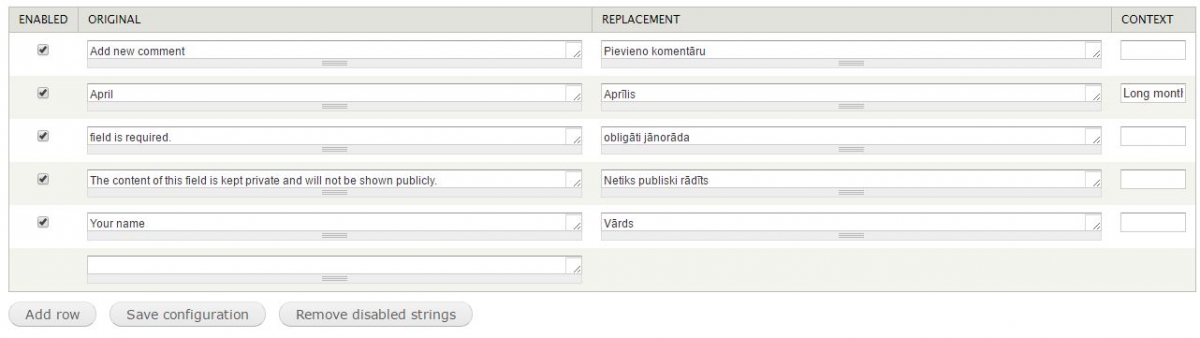
Drupal string overrides configuration page
Now, for the translating month names in other language, it was a bit trickier - and involves writing a new function in sites template.php file. I took following code from here.
function monthname_install() {
  $months = array(
    'January',
    'February',
    'March',
    'April',
    'May',
    'June',
    'July',
    'August',
    'September',
    'October',
    'November',
    'December',
  );

  $options['context'] = 'Long month name';

  foreach($months as $m) {
    t($m, array(), $options);
  }

  drupal_set_message(t('Month names have been made available for translation. The rest is up to the translation team :-)'));
}

function monthname_cron() {
  drupal_uninstall_modules(array('monthname'));
}
Add it to your template.php file, clear cache and from string overrides configuration page again enter Original string, for example April and Replacement string, Aprīls (translated in Latvian) in context field enter Long month name
Here is the final Drupal comment form translate using string overrides module:
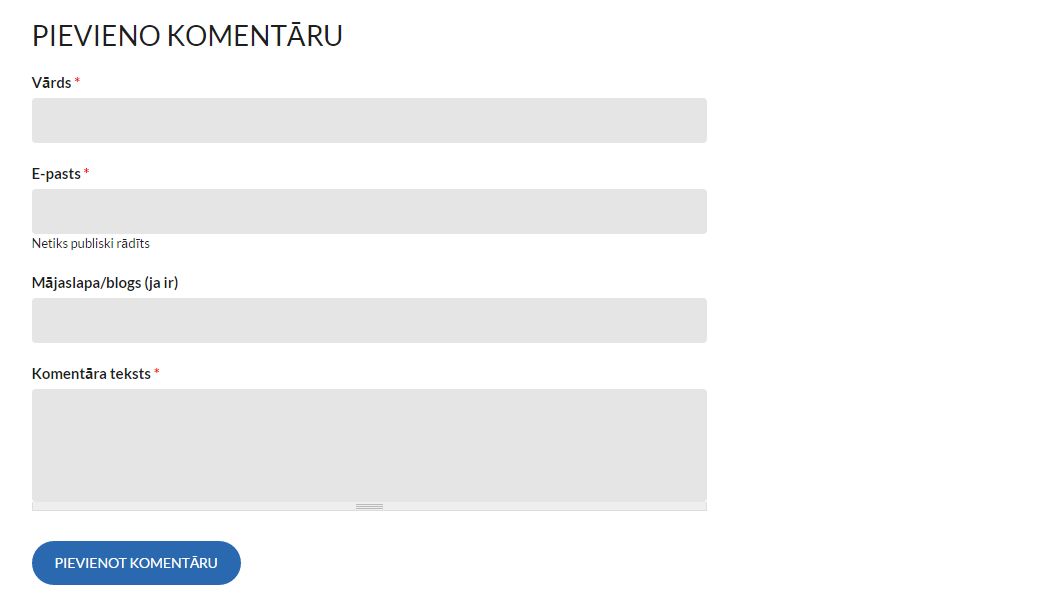
Drupal comment form translated to Latvian using String Overrides module
Hope it helps!