Here are some other cool tutorials you might find interesting:
- How To Display Social Share Buttons On Drupal Taxonomy Pages
- Floating social share buttons (without using modules)
- How to align Facebook like, Google + and Twitter buttons? (CSS tricks)
- Facebook like button for Drupal site
Drupal Floating Block
From module creators: The Floating block module allows you to keep html blocks, selected using jquery selectors in a fixed position on the page as you scroll. It works in a similar way the table header fixer in Drupal Core. This means that when the user scrolls their browser selected parts of the page can stay in the users view.
This is extremely useful when you have pages with lots of content and you want a side menu to stay in view.
Now here is an example how to configure floating block for social share buttons
I will create a custom view and then will display it as block in my theme. Add two fields: path and custom code.
Make sure your path is using absolute path.
Here is the code to enter in custom text field (you can customize it), make sure you are excluding all except custom text field
<div class="social-share">
<div class="fb-like" data-href="[path]" data-layout="box_count" data-action="like" data-show-faces="false" data-share="true"></div><br/>
<a href="https://twitter.com/share" class="twitter-share-button" data-via="Reinis_Fischer">Tweet</a></br/>
<div class="g-plus" data-action="share" data-annotation="bubble" data-height="20"></div>
</div>
Now add a contextual filter under advanced settings from your view dashboard:
- Content: Nid
- Provide default value: Content ID from URL
Save your view, visit blocks page and add your newly created block to the some region of your theme, I will add this to the left sidebar. Now visit you node page and see if that worked.
Since we have this lovely neat Floating Block module enabled, we should inspect our theme to find CSS selector around our newly created block - in my case it is #block-views-nid-social-share-block, and paste that line in modules config page:
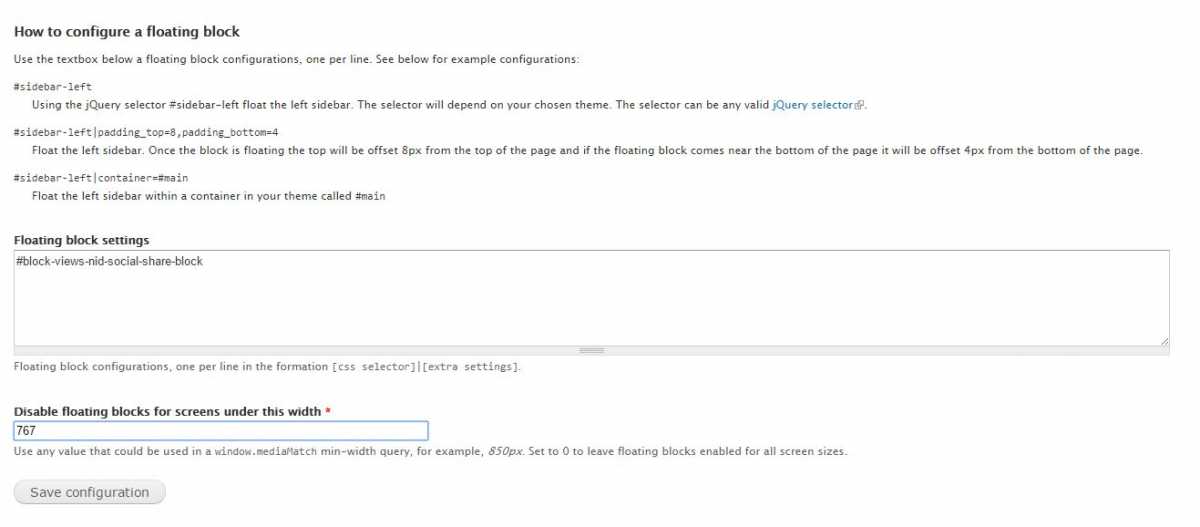
Floating block config page
Since I'm using responsive theme I decided to disable floating block on screens smaller than 767px.
Try a live example here: Postcards From Tbilisi
Hope this helps, feel free to drop a comment or contact me if you find any difficulties here.